
Planner View in Service Jobs: Your Team. Your Plan. At a Glance.
Published on 30.06.2026
WAKU Care
WE EMPOWER UPTIME HEROES
Your Software Platform that keeps machines running.
Planning has always been one of the biggest challenges in maintenance. Who takes on which job? When does a team run into double-booking? Where are there idle periods that could be used more effectively? Until now, the answer to these questions was often: a lot of experience, a lot of back-and-forth, and a good feel for the team.
With the new Planner View in Service Jobs, that changes fundamentally.
What is the Planner View?
The Planner View is an interactive Gantt view directly in WAKU Care, accessible from within your Service Jobs. You see your tasks and resources visually on a timeline and can plan, adjust, and optimise directly within the view. Developed in close coordination with our core users, from practice and for practice.
Two Perspectives, One View
The Planner View offers two perspectives that you can switch between at the click of a button:
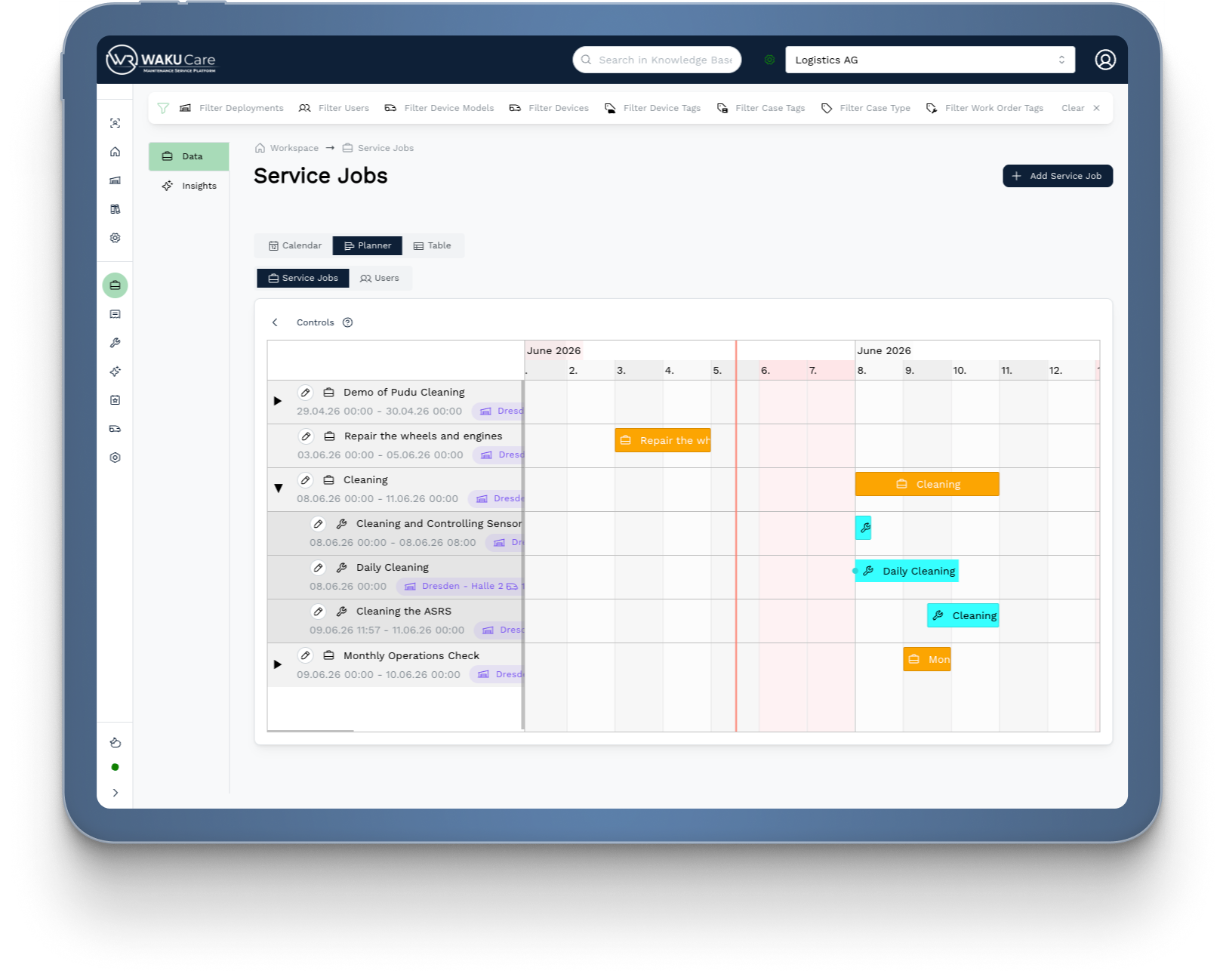
Service Job View
You see all Service Jobs as top-level elements on the timeline. By expanding them, you can see the Work Orders and Cases grouped within. Perfect for getting an overview of the current status of a complete job and understanding how the individual tasks fit together.
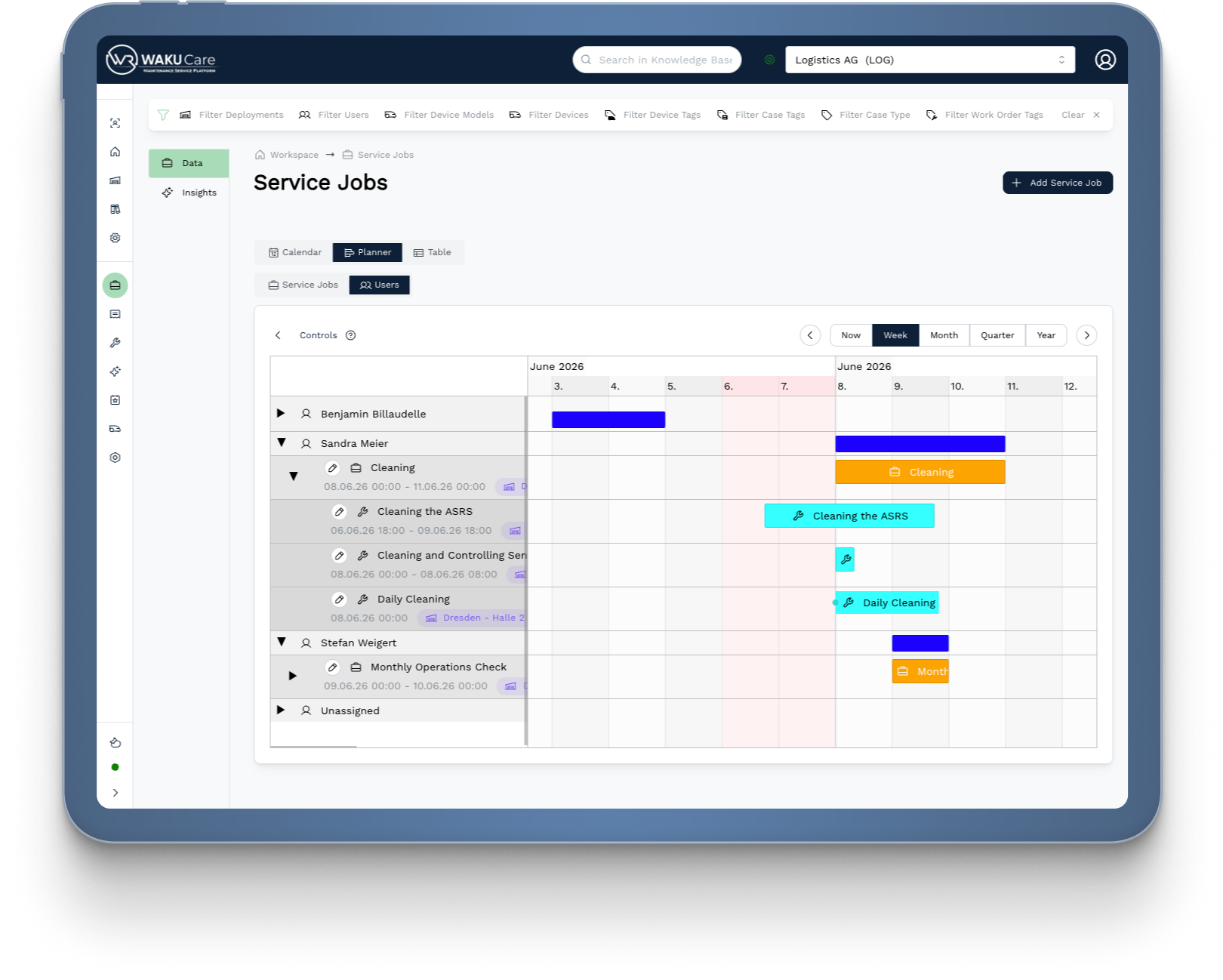
User View
Each team member gets their own row. This can also be expanded, so you can see which Service Jobs, Work Orders and Cases are currently assigned to that person. This keeps you in control of your team's workload at all times.
Plan Directly on the Timeline
What makes the Planner View special is the direct interaction with the timeline. You don't need to open forms or navigate into individual jobs to make adjustments:
With Drag & Drop you move an element on the timeline and immediately change its start or end date. Or you drag just one of the edges of the element to adjust its duration specifically. What used to take several clicks and manual entries now happens in seconds, right within the overview.
In addition, the integrated zoom buttons let you jump instantly between the time levels Week, Month and Year. Whether you want to plan the next few days in detail or keep the big picture for the quarter, you always have the right perspective at hand.
Your Benefits at a Glance
Resources at a Glance
You immediately see who is busy when and where capacity is available. No lengthy queries within the team, no manual gathering of information.
Double-Bookings Instantly Visible
If two tasks require the same person at the same time, you see it immediately in the User View. You can react and reschedule right away, before it becomes a problem in day-to-day operations.
Identify and Fill Idle Periods
Free capacity stands out immediately on the timeline. Instead of leaving resources unused, you can deliberately fill them with planned tasks and increase your team's efficiency.
Faster and More Reliable Planning
Direct editing on the timeline via Drag & Drop eliminates the need to manually open and adjust individual jobs. Planning changes that used to take minutes now happen in seconds.
Context is Preserved
Service Jobs, Work Orders and Cases remain structurally connected. You are never planning in a vacuum, but always with the full context of the respective job.
Developed Together with Those Who Use It Every Day
The Planner View did not emerge from a whiteboard exercise. We developed this UI/UX concept in close coordination with our core users, people who use WAKU Care daily and know exactly what works in practice and what does not. Their feedback, workflows and pain points shaped the view into what it is today. The result is a planning view that feels like it was made for your team. Because it was.
Discover It Now
The Planner View is now available in your Service Jobs. Simply open the Service Jobs overview and switch to the Planner View in the top right corner. We look forward to your feedback.
Questions or comments? Reach out to us directly or leave your feedback via the WAKU Care Customer Portal.
WE EMPOWER UPTIME HEROES 👩🔧♥️🔧
WAKU Robotics supports you in choosing the right robot for your application. We take care of the procurement of the robots as well as the on-site test. Our WAKU Care software helps you to operate the robots across manufacturers and to analyze the processes.
Contact WAKU